7 Best Free Apps to Listen to Music Offline Without Internet or Data
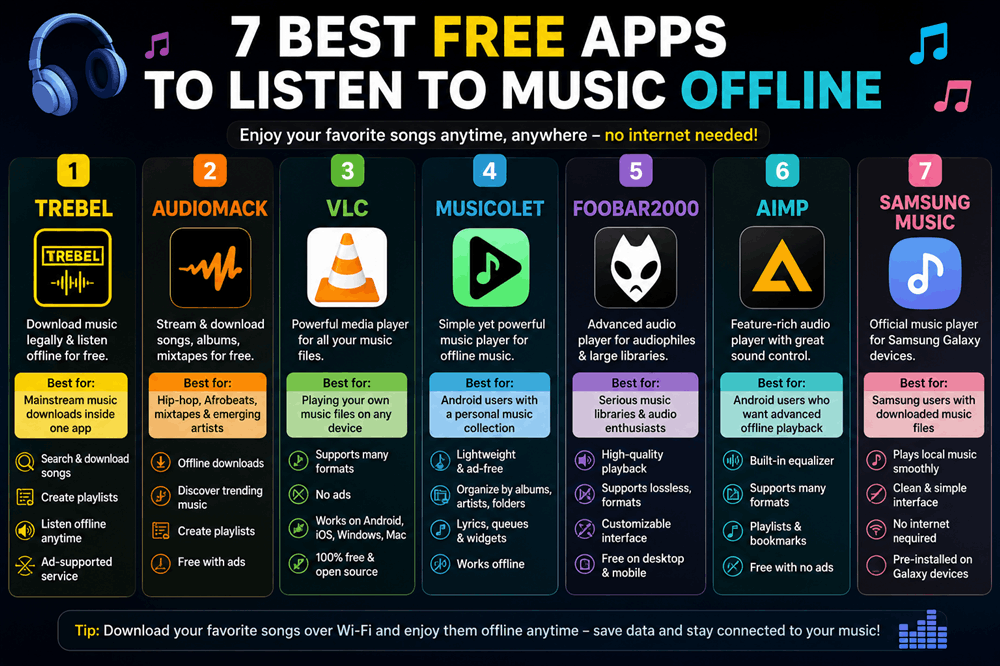
The best free apps to listen to music offline are TREBEL, Audiomack, VLC, Musicolet, foobar2000, AIMP, and Samsung Music. The important difference is that not all of these apps provide free songs themselves. TREBEL and Audiomack can save supported music inside their apps for offline listening, while players such as VLC and Musicolet are designed primarily for music files you already own or have legally downloaded.
That distinction matters because many popular streaming apps advertise free listening but put offline downloads behind a paid subscription. If your goal is to listen without Wi-Fi, cellular data, or a monthly fee, the following options are much more useful.
1. TREBEL
Best for: Free mainstream music downloads inside one app
TREBEL is one of the clearest answers for someone who wants to download music legally and listen offline without paying for a traditional streaming subscription.
The app is designed around free, ad-supported music downloading. You search for a song, artist, album, or playlist, download supported music while connected to the internet, and then play it later without Wi-Fi or mobile data.
This makes TREBEL different from services where the free tier allows streaming but disables the download button.
Its biggest advantage is convenience. You do not need to build your own MP3 collection first.
You can:
- Search for music inside the app
- Download supported songs
- Create playlists
- Listen without an internet connection
- Use the service without a conventional monthly music subscription
There is a tradeoff. Free music has to be funded somehow, and TREBEL relies heavily on advertising and other monetization methods.
Catalog availability can also depend on your country and licensing agreements.
Still, if your definition of an offline music app is “I want to find songs in the app and save them without paying every month,” TREBEL is one of the strongest places to start.
2. Audiomack
Best for: Hip-hop, Afrobeats, emerging artists, mixtapes, and free offline discovery
Audiomack combines streaming, music discovery, and offline listening.
Supported songs can be added to your offline library so you can continue listening when you have no connection.
Audiomack is particularly strong for hip-hop, Afrobeats, dancehall, electronic music, mixtapes, and independent releases. It also contains music from established artists, although its catalog and offline rules are different from those of services such as Spotify or Apple Music.
The app’s free offline system has become more limited than it once was. Some downloads may be designated as premium, while free users can still save a selection of supported songs for offline listening.
That means you should not assume that every track you find can be downloaded for free.
Even with that limitation, Audiomack remains useful because free offline playback is genuinely part of the platform rather than being completely locked behind a subscription.
Another advantage is its discovery experience.
If you enjoy finding music beyond the biggest mainstream playlists, Audiomack can sometimes feel more adventurous than the largest streaming services.
3. VLC Media Player
Best for: Playing your own music files on almost any device
VLC is one of the best completely free options if you already have music stored on your phone, tablet, or computer.
It does not provide a Spotify-style catalog of commercial songs.
Instead, VLC plays your own files.
Once the files are stored locally, no internet connection is needed at all.
VLC supports a wide variety of audio formats and is available on major platforms, including Windows, macOS, Android, and iPhone.
It is particularly useful if your music collection includes more than ordinary MP3 files.
For example, people with FLAC files, older digital music libraries, ripped CDs, downloaded purchases, live recordings, or unusual file formats may find VLC much more flexible than a typical streaming app.
VLC is also:
- Free
- Open source
- Ad-free
- Useful for both music and video
- Capable of playing locally stored media
If you already own your music, VLC is arguably a better offline solution than trying to force a streaming service to behave like an old-fashioned MP3 player.
4. Musicolet
Best for: Android users with a personal music collection
Musicolet is designed specifically for offline music rather than streaming.
That means it does not try to sell you a catalog, recommend trending artists, or constantly connect to an online service.
You provide the music files.
Musicolet organizes and plays them.
For Android users, that simplicity is one of its biggest strengths.
The app can organize local music by albums, artists, folders, and playlists. It also supports multiple queues, tag editing, embedded lyrics, widgets, lock-screen controls, and Android Auto.
Musicolet is especially appealing to people who miss the days when a music player was simply a music player.
If you have hundreds or thousands of MP3, FLAC, M4A, or other supported files on your phone or SD card, you can listen as much as you want without consuming data.
It is also known for avoiding the advertising-heavy experience found in many free Android music players.
The limitation is straightforward: Musicolet does not give you free commercial music.
You need to supply the files yourself.
5. foobar2000
Best for: Serious music libraries and listeners who care about file formats
foobar2000 has long been popular with listeners who maintain their own digital music collections.
It is less flashy than mainstream streaming services, but that is part of its appeal.
The focus is playback rather than discovery.
foobar2000 can play local audio files on computers and mobile devices, making it a useful choice for people who want their music available offline permanently rather than temporarily cached by a subscription service.
It is particularly suitable for:
- Large personal music libraries
- Lossless audio
- Albums stored locally
- Users who organize music by folders
- People moving away from streaming subscriptions
The mobile app is available on both Android and iOS.
If you simply want a colorful app with a giant catalog of current hits, foobar2000 is probably not the best choice.
If you care more about controlling your own music collection, it becomes much more attractive.
6. AIMP
Best for: Android users who want an advanced offline audio player
AIMP is another strong option for playing music files you already have.
It supports a long list of formats, including familiar types such as MP3, AAC, FLAC, WAV, M4A, OGG, and Opus, along with several formats that casual listeners may rarely encounter.
The app is designed more like a traditional music player than a streaming platform.
You create playlists, organize your files, adjust playback, and listen without needing an active internet connection once the music is stored on your device.
AIMP also offers features that may appeal to more particular listeners, including playback queues, bookmarks, crossfading, equalization options, Android Auto support, and extensive control over how music is played.
Like VLC and Musicolet, AIMP does not magically give you free copies of commercial songs.
It is a player for music you already possess.
But if your goal is truly offline listening with no recurring subscription, owning the files yourself is one of the most reliable solutions.
7. Samsung Music
Best for: Samsung Galaxy users who already have downloaded music
If you use a Samsung Galaxy phone or tablet, you may not need to install a complicated third-party player at all.
Samsung Music is designed for Samsung Android devices and can play music stored locally on the device.
That makes it convenient for people who transfer songs from a computer, buy downloadable music, rip their own CDs, or maintain an older MP3 collection.
Once the files are on your Galaxy device, they can be played without Wi-Fi or mobile data.
Samsung Music is especially useful because it feels integrated with the phone rather than added on afterward.
Its main disadvantage is obvious: it is primarily intended for Samsung devices.
Android users from other manufacturers are better served by VLC, Musicolet, foobar2000, or AIMP.
Which Free Offline Music App Is Best?
The answer depends on where you expect the music to come from.
If you want the app itself to provide music that you can save offline without a normal paid subscription, start with TREBEL.
If you enjoy hip-hop, Afrobeats, mixtapes, and discovering emerging artists, Audiomack is another strong choice.
If you already own downloaded music files, the situation changes completely.
VLC is the best all-around choice across multiple devices.
Musicolet is excellent for Android users who want a focused offline music library.
foobar2000 suits listeners with more serious digital collections, while AIMP offers extensive Android playback controls.
Can You Listen to Spotify Offline for Free?
Not for normal music downloads.
Spotify’s free tier allows streaming with restrictions and advertising, but downloading songs, albums, and playlists for offline music listening is a Premium feature.
This is an important distinction because Spotify itself is free to install.
A free app is not necessarily a free offline music service.
You can download Spotify without paying, but that does not mean you can download its music catalog for offline playback without a subscription.
Can You Listen to YouTube Music Offline for Free?
Offline music downloading is primarily associated with YouTube Music Premium.
Premium members can download songs, playlists, and albums to their mobile devices and use features designed specifically for offline listening.
That means YouTube Music is excellent for offline listening if you already pay for the service, but it is not the strongest answer for someone specifically searching for completely free offline music.
Can You Listen to Apple Music Offline for Free?
Apple Music lets subscribers download music for offline listening, but it is fundamentally a subscription service.
If you cancel the subscription, downloaded Apple Music catalog songs are not the same as MP3 files you purchased and own permanently.
However, an iPhone can still play music files you own without an ongoing subscription.
For people who want permanent offline access, this difference between subscription downloads and owned music files is important.
Why Do Most Music Apps Charge for Offline Listening?
Streaming music involves licensing.
When Spotify, Apple Music, YouTube Music, or another service gives you access to millions of commercial recordings, agreements determine how artists, labels, publishers, and other rights holders are compensated.
Offline playback is valuable because it allows you to keep listening even when the streaming service cannot display advertising or maintain a constant connection.
That makes it a natural premium feature.
Services that provide offline music without a conventional subscription generally need another way to pay for licensing, such as advertising.
That is why a completely free app offering unlimited offline access to every popular song with no ads, no subscription, and no restrictions should immediately make you cautious.
Be Careful With “Free MP3 Download” Apps
Searching an app store or the web for free offline music can lead to apps promising unlimited downloads of virtually any song.
Not all of them are legitimate.
Some scrape audio from websites, use unclear sources, disappear from app stores frequently, or request permissions that do not make sense for a music player.
Others fill the interface with aggressive advertisements or misleading download buttons.
A safer approach is to use either:
- A legitimate service that clearly licenses music for offline use
- A trusted offline player for music files you legally own
If an unknown app claims it can permanently download every current commercial song for free with no restrictions, it is worth asking how that arrangement could legally work.
Do Offline Songs Become MP3 Files?
Usually not when you download them through a streaming app.
A Spotify, Audiomack, YouTube Music, or similar in-app download is generally stored for use by that app.
You normally cannot browse your phone’s storage, find a normal MP3, and move it freely to another music player.
This protects licensing agreements and prevents an offline feature from becoming an unrestricted music-download service.
Local music players work differently.
If you already have an MP3 or FLAC file, VLC or Musicolet can play the actual file stored on your device.
How Much Storage Does Offline Music Use?
It depends on audio quality and song length.
A compressed song may occupy only several megabytes, while a high-quality lossless file can be many times larger.
A few albums rarely cause problems on a modern phone, but a collection containing thousands of songs can consume tens or hundreds of gigabytes.
If your phone supports removable storage, keeping a large music library on a microSD card can be particularly convenient.
Otherwise, check your available storage before downloading enormous playlists.
Does Offline Music Use Data?
Playing a song that is genuinely stored offline should not require cellular data for the audio itself.
The app may still occasionally connect to the internet for account verification, artwork, advertisements, recommendations, synchronization, or other features.
If saving data is especially important, put your phone into airplane mode and test the music before a flight, road trip, or other situation where you expect to have no connection.
If it plays in airplane mode, you know the track is genuinely available offline.
What Is the Best Option for a Long Flight?
Download everything before leaving home.
Do not wait until you are sitting on the plane to discover that an album was only saved to your streaming library rather than downloaded to your device.
Open your chosen app, download your playlists over Wi-Fi, and then temporarily enable airplane mode.
Try several songs.
If they still play, you are ready.
TREBEL or supported Audiomack downloads can work if you want an in-app catalog, while VLC, Musicolet, and foobar2000 are exceptionally reliable when the music files already live on your device.
The Bottom Line
If you want a free app that provides music and allows supported songs to play offline, TREBEL is one of the simplest choices, while Audiomack is especially useful for music discovery and offers free offline access to a selection of tracks.
If you already have your own songs, you have even better options.
VLC, Musicolet, foobar2000, AIMP, and Samsung Music can turn your phone into a traditional offline music player without requiring a streaming subscription.
The main thing to remember is that “free music app” and “free offline music” are not the same thing.
Spotify and YouTube Music can be used for free in various ways, but their normal offline music downloads are tied to paid plans. If you want to spend nothing and still listen without internet, use a legitimate free offline service or keep a personal music collection stored directly on your device.
Once the songs are actually downloaded, your connection stops mattering. That is the real advantage of offline music: the subway tunnel, flight, road trip, weak signal, or limited data plan can no longer decide when your playlist stops.