How to Listen to Music While Playing Roblox on Any Device
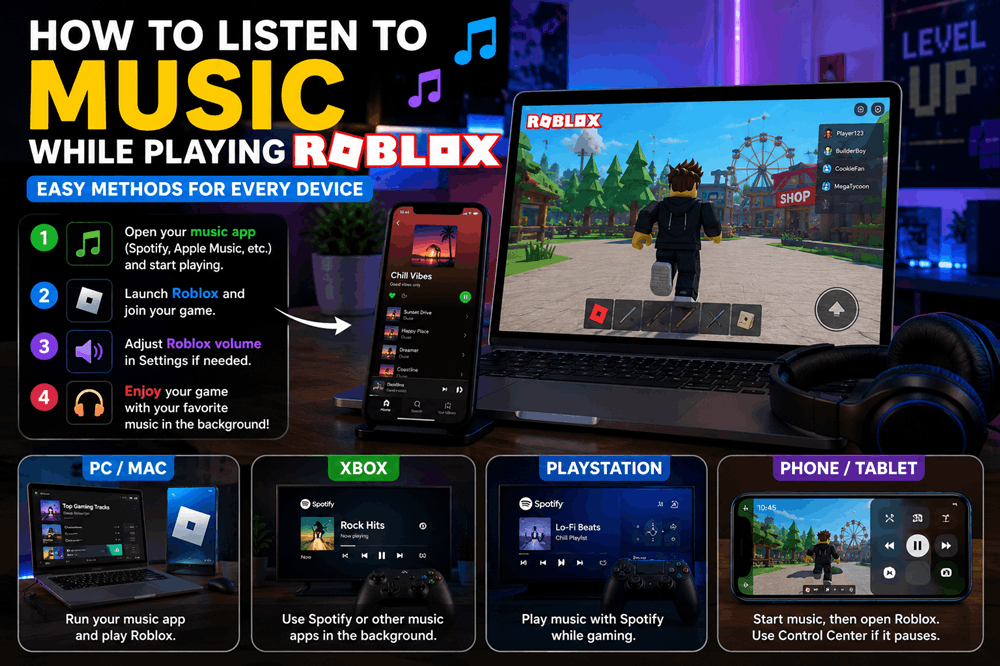
You can listen to music while playing Roblox by running a music app such as Spotify, Apple Music, or another audio player in the background while Roblox is open. The easiest method is on a computer, Xbox, or PlayStation. On phones and tablets, background music can also work, although Roblox or your operating system may occasionally pause the music when you switch apps.
If the music and Roblox sounds compete with each other, lower or mute Roblox’s in-game volume and leave your music player at a comfortable level. Roblox includes an in-experience volume control in its Settings menu.
How to Listen to Music While Playing Roblox on PC
Listening to your own music while playing Roblox is particularly easy on a Windows computer because several apps can play audio at the same time.
Try this:
- Open Spotify, Apple Music, YouTube Music, or your preferred music player.
- Start the playlist, album, or song you want to hear.
- Leave the music playing and open Roblox.
- Join the Roblox experience you want to play.
- Adjust the music and Roblox volumes until they sound balanced.
Your music should continue playing while Roblox runs.
If the Roblox experience has loud background music of its own, open the Roblox menu, select Settings, and reduce the Volume.
You can mute Roblox completely if you want to hear only your personal playlist, although doing that also removes useful game sounds in experiences where audio matters.
Use Spotify Through Xbox Game Bar on Windows
Windows players can also use Xbox Game Bar as a convenient way to control Spotify without repeatedly switching away from Roblox.
On supported Windows systems, Xbox Game Bar includes Spotify integration for controlling music while gaming.
Press Windows key + G to open Game Bar while you are playing.
This can make it easier to pause a song, change tracks, or return to your playlist without closing Roblox.
For players who frequently listen to Spotify while gaming, this is one of the cleanest setups.
How to Listen to Music While Playing Roblox on a Mac
The process on a Mac is similarly simple.
- Open your preferred music app.
- Start playing music.
- Open Roblox.
- Join an experience.
- Adjust Roblox’s volume if the game audio is too loud.
You can use Apple Music, Spotify, a browser-based music service, or locally stored audio.
If you want quick control over playback, use your keyboard’s media controls when available rather than constantly switching windows.
How to Listen to Music While Playing Roblox on iPhone
Listening to music while playing Roblox on an iPhone can be a little less predictable because mobile apps sometimes take control of audio when they open.
Start with this method:
- Open Spotify, Apple Music, or another music app.
- Start the song or playlist you want.
- Open Roblox.
- Join your game.
If the music continues playing, you are finished.
If Roblox pauses it, open Control Center and press the play button on your music again. On current iPhones, Control Center provides access to music playback controls.
Then return to Roblox.
This can allow background playback to continue, although behavior may vary depending on the iPhone, iOS version, music service, and Roblox experience.
How to Open Control Center Without Closing Roblox
On most newer iPhones, swipe down from the upper-right corner of the screen.
Find the media controls and tap Play if your music has stopped.
Then close Control Center and continue playing Roblox.
You can also use those controls to pause music or skip to another track without fully reopening your music app.
What If Roblox Keeps Pausing Music on iPhone?
If the music stops every time Roblox becomes active, there may not be a single setting that fixes the problem on every device.
Try restarting both apps first.
You can also:
- Update Roblox.
- Update iOS.
- Restart the iPhone.
- Start Roblox first, then try resuming music from Control Center.
- Turn down Roblox audio before restarting your music.
- Use headphones or an external speaker.
If simultaneous playback still refuses to work, the easiest solution is using a second device for music.
How to Listen to Music While Playing Roblox on Android
Android phones generally use the same basic method.
- Open Spotify, YouTube Music, or another audio app.
- Start playing your music.
- Open Roblox.
- Join an experience.
If the song continues, you can play normally.
If it pauses, pull down the notification shade and press Play on the media controls.
Android provides system media controls that can be accessed from the notification area or lock screen, although exact appearance and behavior vary by phone manufacturer.
Why Does My Music Stop When I Open Roblox?
The problem usually comes from the way mobile devices manage audio.
Apps can request control over audio playback when they start producing sound. A game may therefore interrupt a music app even though both programs are technically still open.
This is much less noticeable on desktop computers, where several programs routinely play audio simultaneously.
Phones are more complicated because battery management, background-app rules, manufacturer software, Bluetooth connections, and audio behavior can all affect playback.
That is why one person’s Android phone may play Spotify and Roblox together perfectly while another phone behaves differently.
How to Listen to Spotify While Playing Roblox
Spotify works well for Roblox because you can control playback from multiple kinds of devices.
On PC or Mac:
- Open Spotify.
- Start your playlist.
- Launch Roblox.
- Lower the Roblox volume if necessary.
On mobile, start Spotify before Roblox and use your phone’s media controls if playback pauses.
Spotify is also particularly useful on game consoles because Xbox and PlayStation support background music playback while games are running.
How to Listen to Music While Playing Roblox on Xbox
Xbox has built-in support for music apps that can continue playing in the background while you use games and other apps. Microsoft specifically lists services such as Spotify and Pandora as examples of background-music apps.
To use it with Roblox:
- Download a supported music app from the Xbox Store.
- Open the music app.
- Start your playlist.
- Return to the Xbox home screen.
- Open Roblox.
- Start playing.
The music can continue in the background while Roblox is running.
Press the Xbox button on your controller when you want to access playback controls.
This makes Xbox one of the easiest platforms for combining Roblox with a personal playlist.
How to Listen to Music While Playing Roblox on PlayStation
PlayStation also supports listening to music during compatible games.
Spotify can play music in the background on PS5 and PS4 while you continue gaming.
On PS5, you can generally:
- Set up your music service on the console.
- Open Roblox.
- Press the PS button to open the Control Center.
- Select Music.
- Choose your song, album, or playlist.
- Return to Roblox.
The music should continue while you play.
PlayStation’s controls also make it possible to manage music without completely leaving the game.
Should You Mute Roblox While Listening to Music?
Not necessarily.
Whether you should mute Roblox depends on the experience you are playing.
For an obby, tycoon, simulator, or casual building game, you may not need much of the original audio. Muting Roblox and replacing it with your own music can work well.
Other games depend heavily on sound.
You may need to hear approaching players, alarms, vehicles, footsteps, dialogue, countdowns, or other audio cues.
In those cases, reduce Roblox’s volume instead of muting it completely.
How to Turn Down Roblox Music Without Turning Off Everything Else
Roblox provides an overall in-experience volume setting, but individual experiences can handle their own music and sound effects differently.
Some games include separate settings for:
- Background music
- Sound effects
- Ambient sounds
- Voice chat
- Radio or boombox audio
If the experience provides a separate music switch, use that first.
It allows you to keep important game effects while replacing only the soundtrack with your own music.
If the developer has not included separate controls, you may need to use Roblox’s overall volume setting instead.
Can You Listen to YouTube While Playing Roblox?
Yes on a computer, because a browser can continue playing audio while Roblox is open.
Simply start the video or music in your browser and then switch to Roblox.
On phones, the situation depends on whether the YouTube service and your account support background playback.
If your music stops as soon as you leave YouTube, using a dedicated music app may be easier.
Can You Listen to Apple Music While Playing Roblox?
Yes.
On a Mac or Windows PC, Apple Music can play while Roblox runs.
On iPhone and iPad, start Apple Music before Roblox. If playback stops, try resuming it through Control Center.
On supported PlayStation systems, Apple Music is also available as a console music service in supported countries and regions.
Can You Use Headphones for Music and Roblox at the Same Time?
Yes.
If both Roblox and your music player are producing audio on the same device, they can normally share the same headphones whenever simultaneous playback is supported.
This is particularly convenient on PC because both applications feed into the computer’s normal audio output.
Bluetooth headphones can work as well, although switching devices or opening voice chat can occasionally change audio behavior.
What About Roblox Voice Chat?
Music can make voice chat harder to understand because you are mixing three different audio sources:
- Your music
- Roblox game sounds
- Other players’ voices
If you use voice chat frequently, keep your music relatively low.
You should also avoid playing loud music through your microphone. Other players did not choose your playlist, and the extra sound can make communication difficult.
Roblox provides controls for voice features within supported experiences, so adjust those separately when needed.
Is It Better to Use a Second Device?
Sometimes.
Using one device for Roblox and another for music is the most reliable solution because the two apps no longer have to compete for audio control.
For example:
- Play Roblox on a PC and Spotify on your phone.
- Play Roblox on an iPad and music from a smart speaker.
- Play Roblox on your phone and use another phone or tablet for music.
This setup is particularly useful when mobile Roblox keeps interrupting background playback.
It also gives you separate volume controls for the game and your music.
How to Get the Best Music and Roblox Setup
For the smoothest experience, keep the game slightly louder than your music when audio cues matter.
If you are playing something casual, reverse that balance and let the playlist become the main audio.
Headphones are usually the easiest option because they keep everything clear without disturbing other people.
A long playlist also helps. Constantly switching away from Roblox to choose another song becomes annoying quickly.
Build a playlist before starting the game, turn on shuffle if you want variety, and then leave it running.
Why Listen to Music While Playing Roblox?
Roblox contains an enormous range of experiences, and not all of them require constant attention to their original soundtrack.
Music can make repetitive activities more enjoyable.
Grinding for items, building, decorating, completing an obby, driving around a large map, or waiting for upgrades can feel completely different when paired with a playlist you actually enjoy.
The right music can also change the mood of a game.
A racing experience feels faster with energetic music. A building game can feel calmer with lo-fi or instrumental tracks. Horror becomes either more terrifying or much less frightening depending on what you play.
Your music effectively becomes a personal soundtrack for Roblox.
Why Is My Music Too Quiet While Playing Roblox?
If you can barely hear your playlist, Roblox may simply be louder.
Open the Roblox Settings menu and reduce its volume.
You can also increase the volume inside your music app rather than increasing the entire device volume.
On a computer, operating-system volume controls may give you additional ways to balance different applications.
The goal is not necessarily to make the music louder than everything else.
You want a balance where you can enjoy the song without losing sounds from the game that you actually need.
What Is the Easiest Way to Listen to Music While Playing Roblox?
On a computer, the easiest method is simply to start Spotify, Apple Music, or another player before opening Roblox and leave it running.
On Xbox or PlayStation, use a supported console music app and play it in the background.
On iPhone or Android, start your music first and then open Roblox. If the music pauses, try restarting playback from your phone’s system media controls.
If mobile playback continually stops, use a second device.
That method is less elegant, but it is extremely reliable.
The Bottom Line
Listening to music while playing Roblox is easiest when your device supports simultaneous background audio.
On PC and Mac, start your music player and then launch Roblox. Xbox supports background music apps while games are running, and PlayStation can play supported music services during compatible games. On phones and tablets, start your music before opening Roblox and use Control Center or Android media controls to resume it if necessary.
If the game soundtrack interferes with your playlist, open Roblox Settings and lower its volume.
And if your phone simply refuses to keep both apps playing at once, there is one solution that almost always works: play Roblox on one device and your music on another.
Once everything is set up, your favorite playlist can become the soundtrack to whatever Roblox world you decide to enter next.