Snapchat Story Icon Meanings: What the Eyes, Lock, Screenshot, and Other Symbols Mean
Snapchat Story icons tell you who viewed your Story, whether someone took a screenshot, whether a Story is private, and—in some cases—whether friends watched a Story again. Some icons are available to everyone, while others belong to Snapchat+ or Public Profile features. The most important symbols to recognize are the viewer indicator, screenshot indicator, padlock, and Snapchat+ rewatch eyes.
Snapchat changes parts of its interface over time, so the exact position or appearance of an icon can differ slightly between devices and app versions. The meaning, however, is usually much easier to understand once you know what each symbol is tracking.
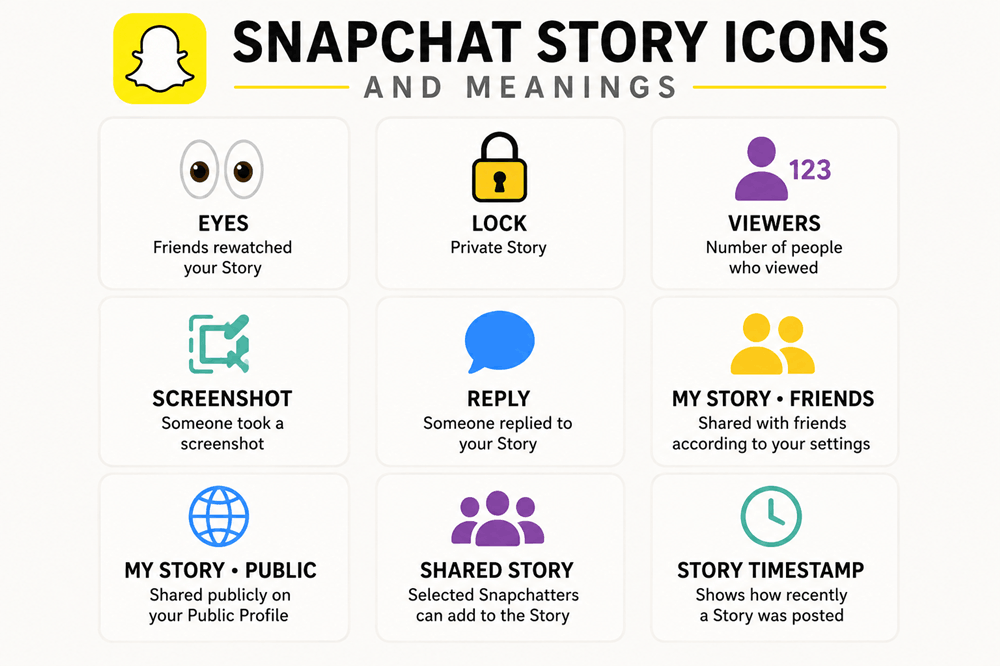
Snapchat Story Icons and Meanings at a Glance
| Icon or Indicator | What It Means |
|---|---|
| 👀 Eyes | Friends rewatched your Story; Snapchat+ feature |
| 🔒 Padlock | Private Story |
| Viewer count | Number of people who viewed your Story |
| Screenshot indicator | Someone took a screenshot of the Story Snap |
| Reply indicator | Someone replied to your Story |
| My Story · Friends | Story shared with friends according to your privacy settings |
| My Story · Public | Story shared publicly through your Public Profile |
| Shared Story | A Story that selected Snapchatters can participate in |
| Story timestamp | Shows how recently a Story was posted; Snapchat+ feature |
What Does the 👀 Eyes Icon Mean on a Snapchat Story?
The eyes emoji is one of the most misunderstood Snapchat Story symbols.
If you have Snapchat+, the 👀 icon can appear as the Rewatch Indicator.
It means that one or more friends watched your Story again.
The number beside the eyes represents how many friends rewatched the Story—not the total number of replays.
For example, if you see:
👀 3
it means three friends rewatched that Story.
It does not necessarily mean the Story was replayed only three times. One person could theoretically watch it more than once, but the indicator counts friends rather than every individual replay.
Snapchat also does not reveal exactly which friends performed the rewatch through this indicator. :contentReference[oaicite:0]{index=0}
Can You See Who Rewatched Your Snapchat Story?
No.
The Snapchat+ Rewatch Indicator tells you the number of friends who watched your Story again, but it does not identify the individual people who rewatched it. :contentReference[oaicite:1]{index=1}
That is an important distinction.
Your ordinary viewer list shows people who watched your Story.
The 👀 indicator tells you that some viewers came back.
It does not place a special mark beside the names of the people who rewatched.
Does 👀 Mean Someone Viewed Your Story Twice?
Broadly, yes—but think in terms of rewatching rather than an exact number of views.
If the eyes indicator appears, at least one friend returned to watch the Story again.
If the number says five, five different friends rewatched it.
It does not mean the Story received exactly five extra views.
Do You Need Snapchat+ to See Story Rewatches?
Yes.
The Rewatch Indicator is a Snapchat+ feature. Standard Snapchat users can still see Story viewers and screenshot information, but the special eyes indicator showing how many friends rewatched a Story is tied to Snapchat+. :contentReference[oaicite:2]{index=2}
What Does the Lock 🔒 Mean on a Snapchat Story?
A padlock means you are looking at a Private Story.
A Private Story is visible only to friends selected by the person who created it.
If you see someone’s Story with a lock, that usually means:
You were included in the group allowed to view that Private Story.
People who are not included are not told that the Private Story exists. Snapchat officially identifies Private Stories with a padlock icon. :contentReference[oaicite:3]{index=3}
Does a Lock Mean the Snapchat Story Is Only for Me?
No.
This is a very common misunderstanding.
If someone adds you to a Private Story, you might be one of:
- Two people
- Ten people
- Dozens of selected friends
The lock only means the Story has a restricted audience.
It does not tell you how many other people can see it.
So if someone posts something flirty on a Private Story, do not automatically assume the message was created exclusively for you.
Can Someone Tell That You Viewed Their Private Story?
Yes.
A Private Story limits who is allowed to see the content, but viewing it still works much like viewing an ordinary Story.
The person who posted it can view the audience information associated with the Story.
Private does not mean anonymous.
What Does the Viewer Count Mean?
When you post to My Story, you can swipe up on a Story Snap to see viewing information.
The viewer count tells you how many Snapchatters have viewed that Story.
Snapchat can show the names of up to 200 people who viewed My Story. Once the number exceeds that threshold, you can still see the overall count, but additional viewer names are not displayed in the same way. :contentReference[oaicite:4]{index=4}
How Do You See Who Viewed Your Snapchat Story?
To check your Story viewers:
- Open your Snapchat profile.
- Tap your Story.
- Open the Snap you want to check.
- Swipe upward.
- Look at the viewer information.
You can use this area to see who watched the Story and whether a screenshot was taken.
What Does the Screenshot Icon Mean on Snapchat Stories?
The screenshot indicator means that somebody captured a screenshot of your Story Snap.
When you swipe up to inspect your Story viewers, Snapchat can show whether a screenshot was taken. :contentReference[oaicite:5]{index=5}
This is different from the eyes rewatch indicator.
Viewer information means someone watched.
Screenshot information means someone captured what appeared on their screen.
👀 Rewatch means one or more friends returned to watch again.
Does Snapchat Tell You Who Screenshotted Your Story?
Snapchat provides screenshot information when you inspect your Story viewers.
That makes Story screenshots much less anonymous than they might feel.
If you are viewing someone else’s Story, the safest assumption is that taking a screenshot may be visible to the person who posted it.
Can Someone Screen Record a Private Snapchat Story?
Private Stories should never be treated as completely protected content.
Snapchat itself warns that people who can view a Private Story can still screenshot or screen-record what they see. :contentReference[oaicite:6]{index=6}
The lock controls access.
It does not make the content impossible to save or share.
What Does a Story Reply Mean?
A Story Reply is a message someone sends in response to something you posted.
If you have a Public Profile and post a Public Story, replies can be viewed alongside Story insights.
When viewing your own public Story, you can swipe up to see viewers and replies. :contentReference[oaicite:7]{index=7}
A reply is different from a normal view because the person actively responded to your content rather than simply watching it.
What Does My Story · Friends Mean?
My Story · Friends is the regular friends-focused Story option.
These Snaps are shared according to your Story privacy settings rather than being placed on your public profile for a broader audience.
This is usually the option people mean when they simply say:
“I posted it on my Snapchat Story.”
What Does My Story · Public Mean?
My Story · Public is different from the friends-only Story.
It is connected with Snapchat’s Public Profile features and allows content to reach followers and potentially a wider audience.
Snapchat currently separates My Story · Public from My Story · Friends. Friends can still encounter your public Story alongside Stories they normally watch, while followers may see it through public areas of Snapchat. :contentReference[oaicite:8]{index=8}
What Is the Difference Between a Public Story and Private Story?
The difference is mainly who can see it.
Private Story
You personally select the friends who are allowed to view it.
It has a padlock icon.
My Story · Friends
It is intended for your friends according to your Story privacy settings.
My Story · Public
It is connected to your public presence and can be viewed by a broader audience.
The content may look similar, but the audience is very different.
What Does a Shared Story Mean?
A Shared Story is designed for participation between selected Snapchatters.
Unlike a Private Story, where only the creator posts Snaps, Shared Stories can allow selected participants to contribute.
When creating Private and Shared Stories, Snapchat lets the creator choose who can view or participate in the Story. :contentReference[oaicite:9]{index=9}
What Are Snapchat Story Timestamps?
Snapchat+ includes a feature called Story Timestamps.
It gives subscribers additional information about when Stories were posted.
The idea is simple: instead of only knowing that a Story is active, you can get more context about how recently it appeared.
This is one of several Snapchat+ Story features alongside the Rewatch Indicator and Story View Notifications. :contentReference[oaicite:10]{index=10}
Why Does Someone’s Snapchat Story Have a Different Icon Than Mine?
Not everyone has identical Snapchat features.
The interface can depend on:
- Whether someone has Snapchat+
- Whether they have a Public Profile
- Whether the Story is private or shared
- Which device they use
- Their app version
- Which Snapchat features have been enabled for the account
That is why one person may see an indicator that does not appear on another account.
What Do Snapchat Public Story Insights Mean?
Public Profile creators can receive considerably more information than an ordinary Story viewer count.
Current Public Story insights can include measurements such as:
- Snap Views
- Unique viewers
- Screenshots
- Replies
- Average viewing time
- Total viewing time
- Clicks or swipe-ups
These are analytics rather than simple social icons, but they explain why creator accounts sometimes display much more Story information than ordinary personal accounts. :contentReference[oaicite:11]{index=11}
What Is the Difference Between Views and Viewers?
This distinction matters especially on public Snapchat Stories.
Views can refer to views accumulated across individual Snaps.
Viewers refers to unique people who watched the Story.
If one person watches several Snaps in a Story, those metrics can therefore behave differently.
This also explains why a creator’s analytics may not match the simple viewer number someone expects.
Does the Order of Snapchat Story Viewers Mean Anything?
People often try to interpret viewer order as a secret ranking of who likes them most.
That is not a reliable way to read Snapchat.
A viewer appearing near the top should not automatically be interpreted as:
- Your biggest admirer
- Someone who keeps checking your profile
- The person who rewatched the Story
- Someone Snapchat believes likes you romantically
The Rewatch Indicator does not identify individual rewatchers, so you cannot use the viewer list to reliably determine who produced the 👀 count.
Does the Eyes Emoji Mean Someone Screenshotted Your Story?
No.
👀 means rewatching when used as the Snapchat+ Rewatch Indicator.
A screenshot is tracked separately.
This is one of the easiest Snapchat Story symbols to confuse because both relate to extra engagement with your content.
Remember:
Eyes = watched again.
Screenshot indicator = captured the screen.
Does the Lock Mean Someone Blocked You?
No.
A lock on a Story does not mean you have been blocked.
In fact, it generally means the opposite: you have permission to see that Private Story.
If you were not selected as an allowed viewer, Snapchat would not normally show you the Private Story at all.
Can You Tell If Someone Has a Private Story You Are Not On?
Normally, no.
Snapchat does not notify excluded friends that a Private Story exists.
If someone creates a Private Story for a small group and does not include you, there is no special icon telling you that you were left out. :contentReference[oaicite:12]{index=12}
Snapchat Story Icon Quick Cheat Sheet
👀 Eyes: Friends rewatched the Story; Snapchat+.
🔒 Lock: Private Story with a selected audience.
Viewer number: Shows how many people viewed the Story.
Screenshot indicator: Someone screenshotted the Story Snap.
Reply: Someone responded directly to the Story.
My Story · Friends: Story intended for friends.
My Story · Public: Public-facing Story.
Shared Story: Selected people can participate in a shared Story.
The Bottom Line
Snapchat Story icons are easier to understand once you separate ordinary Story features from Snapchat+ and Public Profile features.
The 👀 eyes icon is the Snapchat+ Rewatch Indicator and tells you how many friends rewatched your Story, but it does not reveal which friends did it.
The 🔒 padlock identifies a Private Story that only selected friends can view.
Your viewer information shows who watched your Story, while the screenshot indicator lets you know when a Story Snap was captured.
Public Stories can also include replies and more detailed engagement information for creators.
The most important thing is not to assign hidden romantic meanings to every Snapchat symbol.
A lock does not mean the Story was created only for you. The eyes do not reveal which person watched twice. And the position of someone’s name in a viewer list does not reliably prove that they are secretly obsessed with your Story.
Most Snapchat Story icons are much simpler than that: they tell you who can see the Story, how people interacted with it, and what type of Story you are looking at.