Ford Dashboard Symbols and Meanings: Warning Lights Every Driver Should Know
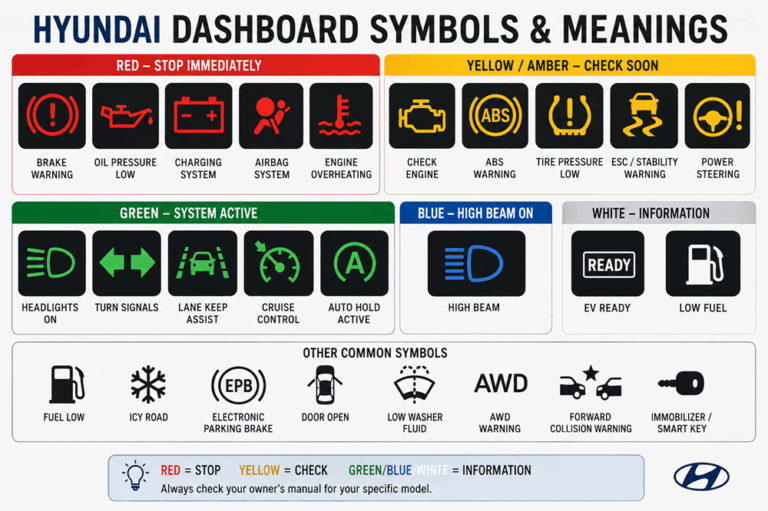
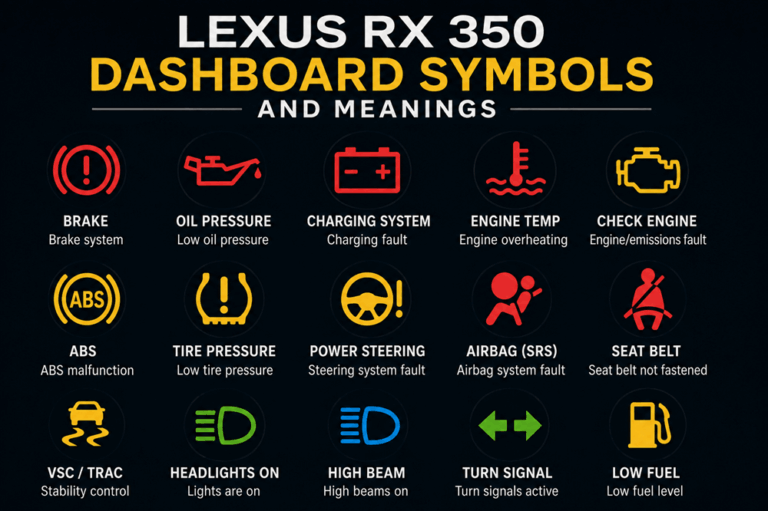
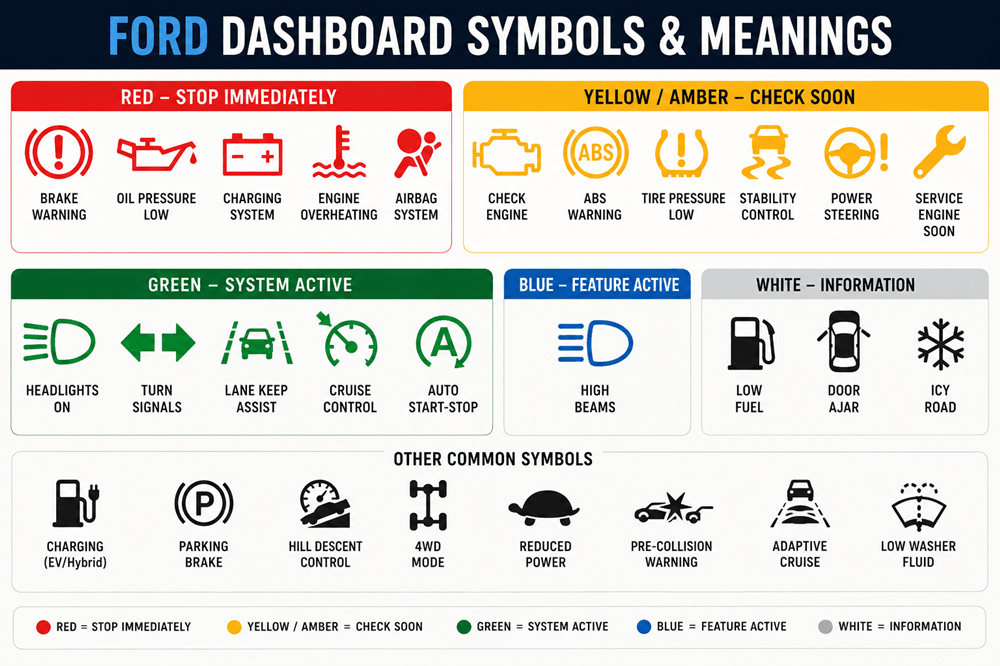
Ford dashboard symbols tell you what your vehicle is doing and whether something needs attention. The easiest way to understand them is by color: red lights usually indicate an urgent problem, yellow or amber lights normally mean something should be checked soon, and green, blue, or white symbols generally show that a feature is operating normally.
The exact symbols can vary between a Ford F-150, Escape, Explorer, Bronco, Mustang, Maverick, Expedition, Transit, or Mustang Mach-E, and they can also change by model year. Still, many of the most important Ford dashboard warning lights are shared across the lineup.
Ford Dashboard Warning Light Colors
Before memorizing individual icons, learn the colors.
| Color | What It Usually Means |
|---|---|
| Red | Serious warning or immediate attention needed |
| Yellow/Amber | Problem detected or service may be needed |
| Green | Feature is operating normally |
| Blue | Feature such as high beams is active |
| White/Gray | Information, standby mode, or system status |
A dashboard light appearing briefly when you start your Ford is often normal. The vehicle is checking its systems.
A light that stays on after startup or suddenly appears while driving deserves more attention.
1. Brake Warning Light
Looks like: An exclamation mark inside a circle, sometimes accompanied by the word BRAKE.
The red brake warning can mean the parking brake is engaged or that there is a problem with the braking system.
If the light disappears after releasing the parking brake, the system is probably operating normally.
If it remains illuminated, possible causes include low brake fluid or another braking-system problem.
What to do: Stop somewhere safe if the light remains on with the parking brake released. If braking feels unusual, do not continue driving.
2. ABS Warning Light
Looks like: ABS inside a circle.
ABS stands for Anti-lock Braking System.
The system helps prevent wheel lock during hard braking so the driver can maintain better steering control.
If the ABS warning remains illuminated, your ordinary brakes may continue working, but the anti-lock function may be unavailable.
What to do: Drive cautiously and arrange service.
If both the ABS and red brake warnings appear together, treat the situation more seriously because additional braking functions may be affected.
3. Engine Oil Pressure Warning
Looks like: An oil can with a drop coming from it.
This red symbol means engine oil pressure is too low.
It is one of the Ford dashboard warning lights you should never ignore.
Low oil pressure can prevent important engine components from receiving enough lubrication, potentially causing severe engine damage.
What to do:
- Pull over safely.
- Turn off the engine.
- Check the engine-oil level.
- Add the correct oil if necessary.
- Do not continue driving if the warning remains illuminated.
This light is different from an oil-change reminder.
4. Battery or Charging System Warning
Looks like: A battery containing plus and minus symbols.
The battery symbol usually indicates a charging-system problem rather than simply telling you that the battery is old.
Possible causes include:
- Alternator problems
- Charging-system faults
- Electrical connections
- Drive-belt issues on applicable vehicles
Your Ford may continue running temporarily using stored battery power, but it can eventually shut down if the battery is no longer being charged.
What to do: Reduce unnecessary electrical use and get the vehicle inspected promptly.
5. Check Engine Light
Looks like: A small engine outline.
The check engine light means the vehicle’s computer has detected a problem with the engine, emissions system, fuel system, ignition system, transmission-related controls, or another monitored component.
A steady light does not always mean an emergency.
Possible causes can range from relatively minor issues to more significant faults.
What Does a Flashing Check Engine Light Mean?
A flashing check engine light is more serious.
It can indicate an engine misfire severe enough to damage the catalytic converter.
What to do: Reduce speed and engine load and have the vehicle inspected as soon as possible.
If the vehicle is shaking, losing power, or running very poorly, stop driving when safe.
6. Engine Coolant Temperature Warning
Looks like: A thermometer above wavy lines.
A red temperature warning means the engine may be overheating.
Continuing to drive an overheating engine can cause severe damage.
What to do: Pull over safely and switch off the engine.
Allow it to cool before investigating further.
Never remove a radiator or coolant-system cap while the engine is hot because pressurized coolant can cause serious burns.
7. Tire Pressure Warning Light
Looks like: A horseshoe-shaped tire with an exclamation mark.
This is the Tire Pressure Monitoring System, or TPMS, warning.
A solid light usually means one or more tires are significantly underinflated.
Low tire pressure can affect:
- Handling
- Braking
- Fuel economy
- Tire wear
- Tire temperature
What to do: Check the pressure in all tires and inflate them to the specification printed on the vehicle’s tire-information label.
Do not use the maximum pressure molded into the tire sidewall as your normal inflation target.
What Does a Flashing Tire Pressure Light Mean?
If the TPMS light flashes and then stays on, the monitoring system itself may have a fault.
A sensor may be damaged, missing, or unable to communicate with the vehicle.
8. Airbag Warning Light
Looks like: A seated person with a circle in front of them.
The circle represents the airbag.
If this symbol stays illuminated after startup, there may be a problem with the Supplemental Restraint System.
That can include:
- Airbags
- Seat-belt pretensioners
- Impact sensors
- Occupant-detection components
What to do: Have the system inspected because a malfunction could affect airbag operation during a collision.
9. Seat Belt Reminder
Looks like: A seated person wearing a diagonal belt.
This means the driver or another monitored occupant has not fastened a seat belt.
The symbol may flash and be accompanied by a chime.
What to do: Make sure everyone is properly buckled.
10. Power Steering Warning
Looks like: A steering wheel, sometimes with an exclamation mark.
Many modern Ford vehicles use electric power-assisted steering.
If this warning appears, steering assistance may be reduced or unavailable.
The vehicle may still steer mechanically, but the steering wheel could become considerably harder to turn.
What to do: Slow down and move somewhere safe if steering feels abnormal. Arrange service.
11. Electronic Stability Control Light
Looks like: A car with wavy skid marks underneath.
Ford may refer to the system as AdvanceTrac, Electronic Stability Control, or traction/stability control depending on the model.
Flashing Symbol
A flashing symbol normally means the system is actively helping control wheel slip.
This can happen on:
- Wet roads
- Snow
- Gravel
- Loose surfaces
- Hard acceleration
A flashing light is usually normal.
Symbol Staying On
A constantly illuminated light may mean the system has detected a fault.
What to do: Drive carefully and have the system checked if the warning remains on.
12. Traction Control Off Light
Looks like: A skidding vehicle with OFF underneath it.
This means traction or stability assistance has been manually disabled.
For normal road driving, the system should generally remain active.
Drivers may occasionally switch it off temporarily when trying to free a vehicle stuck in deep snow, sand, or mud.
13. Low Fuel Warning
Looks like: A fuel pump.
The fuel level is low.
What to do: Refuel soon.
Do not rely on the remaining-range estimate down to the final mile. Driving extremely low on fuel can leave you stranded and may not be ideal for certain fuel-system components.
14. Master Warning Light
Looks like: A triangle containing an exclamation mark.
A master warning means the vehicle has detected something that requires your attention.
The triangle itself usually does not identify the actual problem.
Look at the instrument-cluster message.
It might involve:
- Driver-assistance systems
- Doors or liftgate
- Tire pressure
- Lighting
- Sensors
- Powertrain systems
- Other vehicle functions
What to do: Read the accompanying message.
15. Information Symbol
Looks like: A lowercase “i” inside a circle.
This normally means the vehicle has an informational message available.
It does not necessarily indicate a mechanical problem.
Check the message center or instrument cluster to see what the vehicle is telling you.
16. Door Ajar Warning
Looks like: A vehicle viewed from above with one or more doors open.
A door, hood, or liftgate may not be securely closed.
Some Ford digital dashboards show exactly which opening is affected.
What to do: Stop when safe and make sure everything is properly latched.
17. Low Washer Fluid Warning
Looks like: A windshield with water spraying upward.
This means the windshield-washer reservoir is running low.
The vehicle can still be driven, but poor windshield visibility can become a safety problem.
Refill the reservoir with suitable washer fluid.
18. Low Coolant Warning
Some Ford models can display a separate low-coolant warning or message.
This is different from the red overheating symbol.
Low coolant may eventually cause overheating if the problem is not corrected.
What to do: Check coolant only when the engine is cold and inspect for leaks if the level repeatedly drops.
19. Frost or Icy Road Warning
Looks like: A snowflake.
The snowflake warns that outside temperatures are low enough for ice to be possible.
It does not mean ice is definitely present.
Be especially careful on:
- Bridges
- Overpasses
- Shaded roads
- Wet pavement
- Roads near freezing temperatures
20. High Beam Indicator
Looks like: A blue headlight with straight horizontal lines.
This simply means the high-beam headlights are on.
It is not a warning.
Switch back to low beams when approaching other traffic whenever required.
21. Low Beam or Headlight Indicator
Looks like: A green headlamp symbol.
This usually means exterior headlights or low beams are active.
Some newer Ford models show different icons for:
- Automatic headlights
- Low beams
- High beams
- High Beam Assist
- Fog lights
These are normally status indicators.
22. Turn Signal Indicators
Looks like: Green left or right arrows.
The arrows flash when the corresponding turn signal is operating.
If a signal begins flashing much faster than usual, one of the exterior turn-signal lamps may not be working properly.
23. Cruise Control Symbol
Looks like: A small speedometer or gauge.
This shows that cruise control is active or ready.
Vehicles equipped with Adaptive Cruise Control may display additional information showing:
- Selected speed
- Following distance
- Vehicle ahead
- Lane information
The exact icon varies significantly between Ford models.
24. Adaptive Cruise Control Warning
Ford vehicles equipped with Adaptive Cruise Control use radar and sometimes camera systems to help maintain a selected distance from traffic ahead.
A warning can appear if:
- The radar is blocked
- A camera cannot see clearly
- Snow or ice covers a sensor
- Heavy rain interferes with detection
- The system has a fault
Cleaning the windshield and sensor areas may restore normal operation if the problem is temporary.
25. Pre-Collision Assist Warning
Looks like: Vehicles with a collision or warning symbol.
Ford’s Pre-Collision Assist system can warn the driver when it detects a possible frontal collision.
A red or prominent collision warning requires immediate attention.
The system may also report that it is unavailable if a camera or radar sensor becomes blocked.
Always brake and steer as necessary yourself.
Driver-assistance technology does not replace the driver.
26. Lane Keeping System Symbol
Looks like: A vehicle between lane markings.
The Lane Keeping System monitors road markings and can warn or assist if the vehicle begins drifting out of its lane.
Colors often indicate different system states.
For example:
- Green may mean lane markings are detected
- Gray may mean the system is unavailable or waiting
- Yellow may indicate a warning or intervention
Exact behavior depends on the Ford model.
27. Blind Spot Information System Warning
Ford’s BLIS system monitors areas beside and slightly behind the vehicle.
An indicator normally appears in or near the side mirror when another vehicle is detected in the blind spot.
If the system displays a fault or unavailable message, sensors may be blocked or require service.
Do not rely entirely on blind-spot monitoring.
Check mirrors and look over your shoulder before changing lanes.
28. Automatic Start-Stop Symbol
Looks like: The letter A surrounded by a circular arrow.
Many Ford gasoline models have an Automatic Start-Stop system that shuts the engine off temporarily while the vehicle is stopped.
A green symbol generally means the feature has stopped the engine normally.
A gray or crossed-out version may mean conditions are not suitable for automatic stopping.
A yellow warning can indicate a system fault on certain models.
29. Parking Brake Symbol
Looks like: A P inside a circle or the word PARK.
On Ford vehicles with an electronic parking brake, this symbol indicates the parking brake is applied.
A separate warning may appear if the electronic parking-brake system develops a fault.
Make sure the normal parking-brake indicator goes off after releasing it.
30. Hill Descent Control Symbol
Looks like: A vehicle driving down a steep slope.
Certain Ford SUVs and trucks have Hill Descent Control.
The feature automatically manages braking to help maintain a controlled speed when descending steep terrain.
A green symbol generally indicates that the feature is active.
A warning color can indicate a fault or unavailable condition.
31. Four-Wheel-Drive Indicators
Ford trucks and SUVs may display several drivetrain symbols, including:
- 2H
- 4H
- 4L
- 4A
- Four-wheel-drive fault
- Differential lock
These indicators are especially common in the F-150, Bronco, Ranger, and Expedition.
A normal 4H or 4L indicator tells you which drivetrain mode is selected.
A wrench or explicit 4WD fault message indicates a problem requiring attention.
32. Wrench Warning Light
Looks like: A yellow wrench.
The wrench is an important Ford-specific warning that often indicates a powertrain or electronic throttle-control problem.
It may be accompanied by:
- Reduced power
- Poor acceleration
- Transmission problems
- Rough running
- Limp-home mode
This symbol is different from a simple maintenance reminder.
What to do: Have the vehicle diagnosed. If performance is severely reduced, avoid continuing to drive unnecessarily.
33. Maintenance or Oil-Life Reminder
Ford vehicles commonly calculate engine-oil life electronically.
When oil life becomes low, the instrument cluster may display a message such as:
CHANGE ENGINE OIL SOON
or
OIL CHANGE REQUIRED
This is routine maintenance rather than the same emergency represented by the red oil-pressure warning.
Remember:
Oil change message = maintenance.
Red oil can = stop and investigate oil pressure.
34. Diesel Exhaust Fluid Warning
Ford diesel vehicles may display a Diesel Exhaust Fluid, or DEF, warning.
The message may indicate:
- DEF level is low
- DEF needs refilling
- The exhaust-fluid system has a fault
Modern diesel emissions systems can eventually restrict vehicle operation if required DEF is not added.
Follow the cluster instructions.
35. Diesel Glow Plug Indicator
Looks like: A small coil or spring.
On Ford diesel vehicles, this indicates that the glow plugs are warming the engine for starting.
Normally, wait for the light to go out before starting when instructed.
If the light flashes while driving, a diesel engine-management problem may be present.
Ford Electric Vehicle Dashboard Symbols
Ford EVs such as the Mustang Mach-E and F-150 Lightning include indicators not found on traditional gasoline vehicles.
36. Ready to Drive Indicator
Because an electric Ford can be completely silent when switched on, the dashboard indicates when the vehicle is ready to move.
Do not assume the vehicle is off simply because you cannot hear an engine.
37. High-Voltage Battery Warning
An EV battery or electrical-system warning can indicate a problem with the high-voltage propulsion system.
The exact symbol varies.
If accompanied by a red warning or reduced-performance message, move somewhere safe and follow the instrument-cluster instructions.
38. Reduced Power Symbol
Looks like: A turtle on some electrified vehicles.
A turtle symbol means vehicle power is being restricted.
Possible reasons include:
- Very low battery charge
- High-voltage battery temperature
- Electrical-system problems
- Protective operating modes
Acceleration and maximum power may be noticeably limited.
39. Charging Indicator
Ford EVs and plug-in hybrids display charging status when connected to external power.
The dashboard or charging-port lights may indicate:
- Charging
- Charging complete
- Charging delayed
- Charging fault
The exact color and display depend on the model.
40. Plugged-In Warning
An electric Ford will normally prevent driving while connected to a charging cable.
A plug or charging symbol indicates that the vehicle remains connected.
Disconnect the charger before attempting to drive.
Which Ford Warning Lights Mean Stop Immediately?
The most urgent Ford dashboard warnings generally include:
Red Oil Pressure Light
Turn off the engine as soon as it is safe.
Engine Overheating Warning
Stop and allow the engine to cool.
Brake System Warning
If the parking brake is released and the red brake warning remains on, especially with abnormal braking, stop and investigate.
Charging System Warning
Get to a safe location because the vehicle may eventually lose electrical power.
Severe Engine Problem
A flashing check engine light or major loss of power deserves immediate attention.
What Do Yellow Ford Dashboard Symbols Mean?
Yellow and amber lights generally mean:
Something needs attention, but an emergency stop may not be required.
Examples include:
- Check engine
- ABS
- Tire pressure
- Stability control fault
- Power steering warning
- Wrench/powertrain warning
- Driver-assistance malfunction
- 4WD fault
The vehicle’s behavior matters as much as the color.
A yellow tire-pressure light in an otherwise normal vehicle is not the same as a yellow wrench accompanied by severe power loss.
Why Do All Ford Dashboard Lights Come On at Startup?
This is usually normal.
When you start your Ford, many warning lights illuminate briefly while the vehicle performs a self-test.
Most should turn off within a few seconds.
A symbol needs more attention when it:
- Stays illuminated
- Appears while driving
- Starts flashing
- Appears with an unusual noise
- Appears with poor vehicle performance
- Is accompanied by a warning message
Why Are Several Ford Warning Lights On at the Same Time?
Modern vehicle systems share sensors and electronic modules.
One failure can therefore trigger several warnings.
For example, a wheel-speed sensor problem may affect:
- ABS
- Traction control
- Stability control
- Hill assistance
A camera or radar problem might temporarily disable:
- Adaptive Cruise Control
- Lane Keeping
- Pre-Collision Assist
Low system voltage can sometimes produce multiple seemingly unrelated warnings as well.
Several lights do not always mean several separate failures.
Can You Keep Driving With a Ford Dashboard Warning Light?
That depends on the symbol.
You can keep driving normally with a blue high-beam indicator.
A yellow tire warning means tire pressure should be checked.
A check-engine light deserves diagnosis.
A red oil-pressure light can mean continuing to drive will destroy the engine.
Always identify the icon before making the decision.
If you are unsure and the vehicle feels abnormal, pull over somewhere safe.
Ford Dashboard Symbols Quick Cheat Sheet
| Symbol | Meaning | What to Do |
|---|---|---|
| Red brake symbol | Parking brake/braking-system warning | Check immediately |
| Oil can | Low oil pressure | Stop engine |
| Battery | Charging-system fault | Move to safe place |
| Thermometer | Engine overheating | Stop and cool engine |
| Engine outline | Engine/emissions fault | Diagnose |
| ABS | Anti-lock brake fault | Drive cautiously |
| Tire + ! | Low tire pressure | Check tires |
| Steering wheel warning | Power steering problem | Service |
| Airbag symbol | Restraint-system fault | Service |
| Skidding vehicle | Stability/traction control | Flashing may be normal |
| Yellow wrench | Powertrain fault | Diagnose soon |
| Fuel pump | Low fuel | Refuel |
| Snowflake | Possible ice | Drive carefully |
| Blue headlamp | High beams active | Normal |
| Green arrows | Turn signals | Normal |
| Lane symbol | Lane system status | Check color/message |
| Collision symbol | Pre-Collision Assist warning | Take immediate control |
| A with circular arrow | Auto Start-Stop | System status |
| Turtle | Reduced EV power | Drive cautiously |
The Bottom Line
Ford dashboard symbols are easiest to understand when you begin with the color.
Red usually means urgent. Yellow means check the problem. Green, blue, and white usually provide information about systems that are operating normally.
Pay particular attention to the red oil-pressure, brake, charging, and overheating warnings because continuing to drive can create safety problems or expensive mechanical damage.
Ford also has several symbols that may be less familiar to drivers switching from another brand, including the yellow wrench for certain powertrain problems, AdvanceTrac or stability-control indicators, Auto Start-Stop symbols, driver-assistance warnings, four-wheel-drive indicators, and EV-specific lights.
The exact appearance and behavior of these symbols vary between Ford models and years. A dashboard icon on a 2015 F-150 may not behave exactly like one on a new Bronco, Explorer, Escape, Maverick, Mustang Mach-E, or F-150 Lightning.
When an unfamiliar warning appears, read the instrument-cluster message and check the owner’s manual for your exact vehicle.
The dashboard is trying to tell you something.
Knowing whether it is saying “feature active,” “check me soon,” or “stop now” can make all the difference.